Hi,
I have installed Slack app through WebCatalog. Works great, but I have one issue I would like to ask about. Normally in slack app shortcut CMD + T opens dialog to pick slack user / channel. However WebCatalog is taking over this shortcut to open a new tab. Can I disable WebCatalog shortcuts to use a full range of webapps shortcuts?
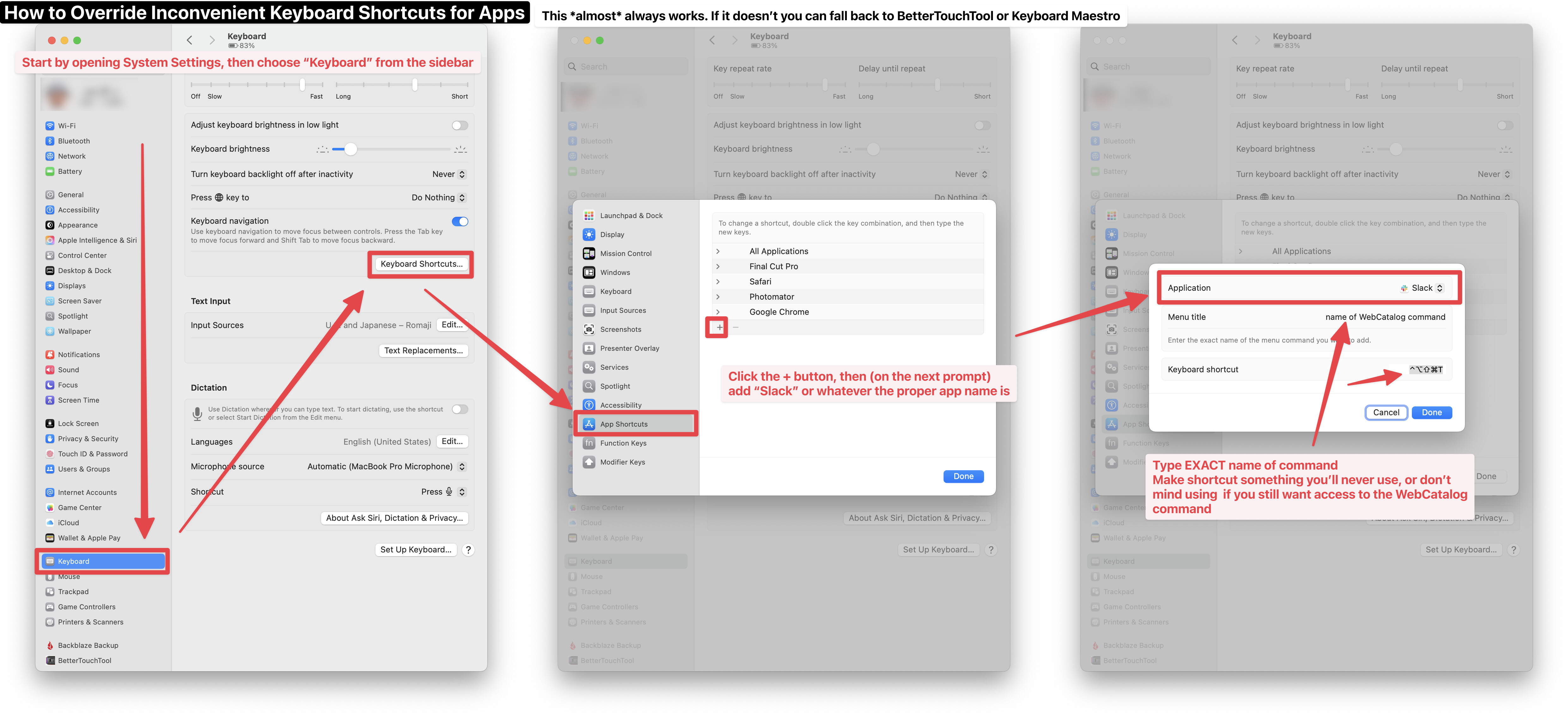
One method to get around this is to override the keyboard shortcut via macOS’s System Settings. To do this, open System Settings, click “Keyboard” in the sidebar, click the “Keyboard Shortcuts…” button, click “App Shortcuts” in the sidebar of the new prompt, click “+” to add an app, choose the app, in “Menu title” type the EXACT name of the command (note that anytime an ellipsis is used, you need to use the single character “…” version, not three periods), then input a keyboard shortcut you either don’t intend to use or don’t mind using as a new command for the WebCatalog command.
Note, there are some instances where this won’t work for whatever reason, but most of the time it should. If it doesn’t, however, you’ll need to fallback to an app like BetterTouchTool or Keyboard Maestro (my app of choice).